


| Summary: Omnilert and ZeroEyes are both camera-based AI gun detection platforms. They spot visible firearms using security cameras. They differ in how alerts are verified and handled. Omnilert lets you choose who verifies an alert, and it can trigger lockdowns and mass notifications automatically. ZeroEyes has its own analysts review every detection, 24/7, before sending an alert. This article also covers an alternative that widens your scope to concealed weapons and helps you screen people and bags at your entry points. |
On user ratings alone, Omnilert vs ZeroEyes are hard to tell apart.
ZeroEyes holds a 4.9 out of 5 rating on Gartner, while Omnilert holds a 4.5 out of 5 rating on Capterra. Both platforms apply AI to existing security cameras to identify visible firearms.
Close scores, however, do not tell you which platform is the right fit for your organization. The distinction lies in how each platform’s AI gun detection works.
If you’re evaluating Omnilert and ZeroEyes for AI gun detection, a side-by-side view of what each one delivers makes the decision clearer. This guide compares how each platform’s AI identifies a gun and how it handles the alert that follows. It also covers alternatives worth considering, including entryway screening for concealed weapons that camera-based AI is not designed to detect.
What AI Gun Detection Systems Are Designed to Do
AI gun detection systems are proactive visual surveillance and threat-recognition technologies. They identify brandished or visible firearms in live video feeds before a shot is fired, enabling a rapid emergency response. The goal is to turn passive video surveillance into an active, automated emergency response system.
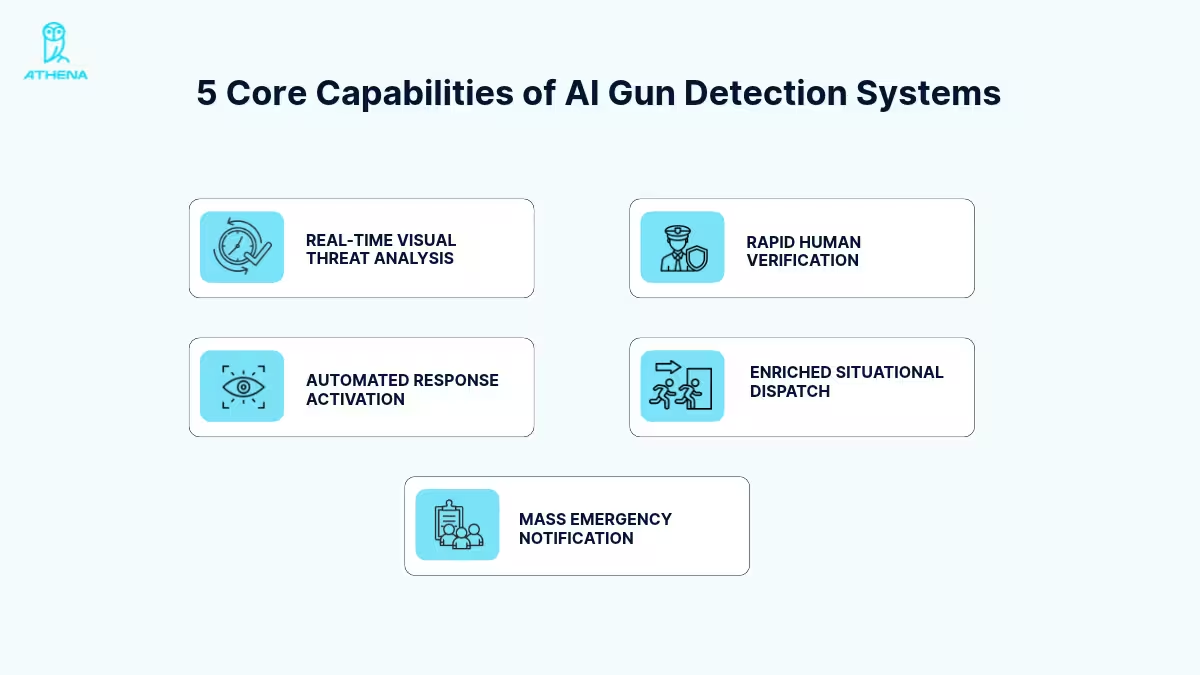
The following 5 core capabilities help these systems manage active shooter threats in real time:
- Real-Time Visual Threat Analysis: The system analyzes live, multi-frame video from existing security cameras. It recognizes the distinct shape of handguns as well as rifles and shotguns within fractions of a second.
- Rapid Human Verification: Everyday objects like phones or power tools can trigger costly, panic-inducing false alarms. Flagged frames go to a security center or internal security staff for a 3- to 5-second human review.
- Automated Response Activation: Once a threat is verified, the system bypasses human delays and starts pre-configured emergency protocols. These include locking smart doors and closing access gates. It can also sound alarms.
- Enriched Situational Dispatch: The software compiles “intelligence packets” and sends them directly to 911 dispatchers and responding police. Each packet includes live video, the camera’s exact location, a description of the suspect, and the weapon type.
- Mass Emergency Notification: The system pushes out text, email, PA announcements, and desktop alerts to thousands of building occupants at once.
If preventing an active shooter attack inside your facility is the priority, an AI entryway security system is the superior first investment. We cover that later in this guide.
Omnilert vs ZeroEyes: Core Differences
At their core, Omnilert and ZeroEyes are trying to solve the same problem: reducing active shooter response times by identifying visible firearms on security cameras before shots are fired. The difference comes in who verifies a detection and what happens after a threat is confirmed.
The table below gives a quick side-by-side view, followed by a closer look at each platform.
| Factor | Omnilert | ZeroEyes |
| How the AI Works | Data-centric AI rooted in U.S. Department of Defense and DARPA research. It’s trained on curated, richly annotated real-world surveillance video. | Analyzes real-world video from existing security cameras. It’s designed to recognize visible threat objects, not to identify or track individuals. |
| Who Verifies Alerts | The customer chooses: Omnilert’s UL Certified operators, an internal security operations center, designated internal staff, third-party monitoring, or a hybrid setup | Trained ZeroEyes analysts at the ZeroEyes Operations Center, which runs 24/7/365. Many have law enforcement and military backgrounds. |
| What Happens After a Threat Is Confirmed | Automatically triggers predefined actions, including mass notifications, police alerts, door lockdowns, and alarms | Delivers verified alerts with actionable information to designated customer personnel and first responders |
| Alert Speed | Detects a gun in “a fraction of a second” and automates responses “in seconds” | Confirms threats “in seconds,” and alerts arrive “often in a matter of seconds” |
| Weapons Detected | Visible firearms | Visible firearms, plus knives through its Analytics Suite |
| Integrations | Existing cameras, video management systems, access control and collaboration tools | Existing cameras and the ZeroLink platform, plus partners such as Axis, Genetec, Milestone and RapidSOS |
Note: The details in this table and the platform breakdowns below come only from Omnilert’s official website and ZeroEyes’ official website. We accessed both sites on October 27th, 2026, and have not independently tested either product. If you’re considering purchasing either platform, you should connect with its sales team for the most current details.
Source: omnilert.com, zeroeyes.com.
Omnilert’s Approach to AI Gun Detection
Omnilert is an AI gun detection platform that spots visible firearms on existing security cameras and automates the response. Its AI is rooted in U.S. Department of Defense and DARPA research on real-time threat recognition. It takes a data-centric approach, using carefully curated, richly annotated training data to improve model quality and realism.
Rather than relying mainly on controlled imagery, the AI trains on real-world surveillance video. That footage reflects actual camera conditions, including varied angles, lighting changes, motion blur, partly blocked views, and everyday objects.
Omnilert says its AI detects a gun in a fraction of a second and automates these responses in seconds. In a case study at EAWR High School, first responders arrived within one minute.
The platform works with existing security cameras and integrates with the wider security setup, from video management systems to collaboration tools. Omnilert lists 20 sectors it serves, including education, healthcare, government, and retail.
ZeroEyes’ Approach to AI Gun Detection
ZeroEyes is an AI gun detection platform that spots visible firearms on existing security cameras and has its analysts verify every detection. The company is a team of former Navy SEALs and military special operations veterans working alongside elite technologists. Its AI analyzes real-world video and is designed to recognize visible threat objects, not to identify or track individuals. Its Analytics Suite also covers knives.
ZeroEyes runs on cameras inside and outside a building, including entrances, exits, choke points and hallways. Every potential threat goes to the ZeroEyes Operations Center (ZOC), where trained analysts and specialists monitor feeds 24/7/365. Many of them have law enforcement and military backgrounds. They review footage to cut false alarms before sending an alert.
Through ZeroLink, the platform links cameras, systems, operators and first responders into a coordinated response loop. Its technology partners include Axis, Genetec, Milestone and RapidSOS, among others. Between January 1 and September 30, 2026, ZeroEyes reports analyzing more than 7 trillion frames. Over the same period, it reports 4,391 customer notifications and 149 apprehensions.
Omnilert vs ZeroEyes: Which One Is Better for You
On paper, Omnilert and ZeroEyes look like the same product. Both watch your existing cameras for a visible gun and send a verified alert when they find one. They differ in who checks the alert and what happens after it goes out. So the better pick depends on how your facility prefers to handle a threat.
Choose Omnilert if you want to:
- Have Omnilert’s UL-certified operators verify your alerts for you.
- Run detection and response from one platform with a built-in mass notification system.
- Trigger lockdowns and alarms automatically once a threat is verified.
- Set different responses for each building or camera group.
- Launch a video conference with your emergency response team as soon as a threat is confirmed.
Choose ZeroEyes if you want to:
- Have ZeroEyes’ own analysts review every detection, 24/7/365, before an alert goes out.
- Rely on reviewers, many with law enforcement and military backgrounds.
- Give responders details like what the shooter looks like and their last known location.
- Send verified alerts to on-site staff and the local 911 center.
- Connect alerts to emergency tools such as RapidSOS or Everbridge through ZeroLink and its partners
Note: There is no publicly available pricing information for either vendor. Contact each one directly for a quote.
Whichever platform you pick, both share one limit. They’re built to act once a firearm is visible on camera, so neither is designed to catch a concealed weapon. That leaves a bigger priority on the table: stopping a weapon before it ever enters your facility. For that, you need an entryway weapon screening system.
Why You Need an Entryway AI Weapon Screening Solution
Hospitals and healthcare facilities need to detect weapons at the entrance because they’re more prone to workplace violence than other industries. Disagreements over medical outcomes and emotionally charged interactions between visitors and medical staff can easily escalate into violence. Even someone legally permitted to carry a weapon may use it impulsively in a moment of anger.
AI-powered entryway concealed weapon screening is designed to keep weapons out of a facility rather than spot them once they’re inside. It shifts the security goal from identifying a shooter to stopping the hidden weapon at the point of entry.
For example, Mayo Clinic describes its passive weapons detection system as a way to “keep weapons out of our hospitals and clinics.” When the system alerts, security staff direct the person to secondary screening. Visitors or staff found with a weapon must return it to their vehicle or residence.
These incidents show why weapon prevention has to start at the entrance:
Methodist Hospitals Northlake Campus, Gary, Indiana (2026)
A patient brought a gun into the hospital, where there were reportedly no metal detectors at the entrance. Afterward, Hospital security consultant Bill Marcisz said, “…..you would like to have some sort of a screening process that would have picked up on that firearm,”
The shooter parked in an adjoining garage and entered the medical building through unlocked doors before killing people inside. The vulnerability wasn’t only a lack of cameras. It was an uncontrolled entry path, which is why weapon prevention must begin at every public and semi-public access point.
Viera Hospital, Florida (2017)
A patient brought a gun into the hospital after being admitted by ambulance and bypassing the facility’s security screening process. She later died from a self-inflicted gunshot wound. The hospital said it would add screening procedures for ambulance-admitted patients.
For hospitals, the entry point isn’t only the front lobby. EMS entrances, employee entrances, loading areas, and patient-transfer paths can all become weapon-entry routes if they sit outside the screening perimeter.
Recommended Read: How To Screen Ambulance Bays Without Triggering False Alarms From Gurneys.
Camera-based gun detection systems like Omnilert and Zeroeyes can only respond once a weapon is visible. Entryway screening checks people for concealed weapons as they walk in and can also check their bags.
That’s why your security plan should look beyond gun detection alone. Our entryway screening is built to do both, and we cover how it works next.
Why Choose Athena Security’s Entryway Weapon Screening Solution
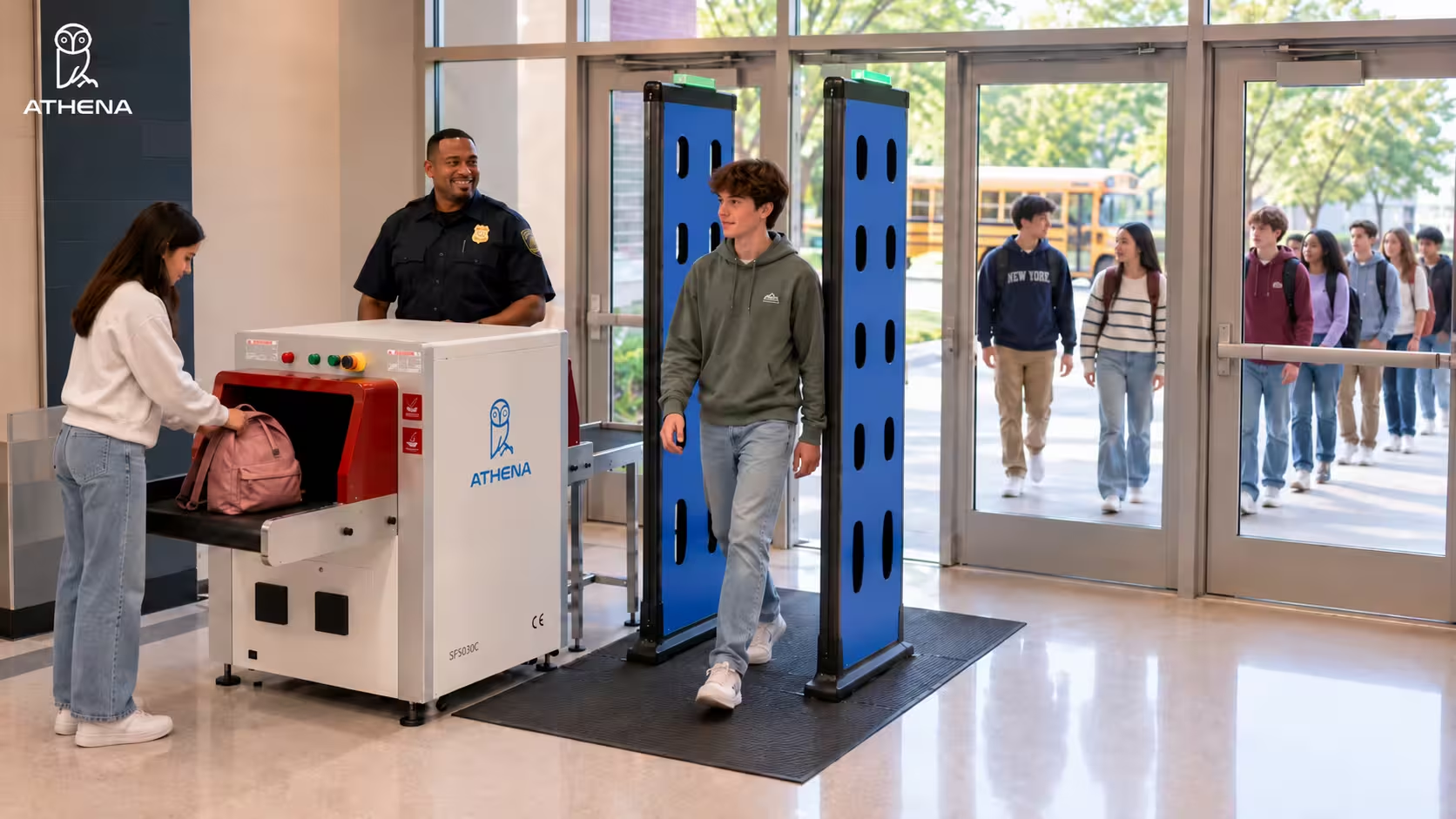
Athena Security’s weapon screening solution pairs two powerful AI-powered screening systems at the entrance. People walk through the AI concealed weapons detection system (CWD), while their bags go through the AI X-ray baggage scanner. Together, they can screen about 2,000 people an hour.
Both systems run side by side.
If a person and their bag both come through clear, they pick up the bag and walk in. If either system flags something, only that person or bag goes to secondary screening. One security operator manages both systems from a single iPad.
The AI separates real threats from everyday belongings like phones, keys, laptops, and chargers to reduce false alarms. It looks at what an object is made of, not just its shape. It can flag:
- Firearms and ammunition
- Knives, including 2- to 2.5-inch blades and razor blades
- Explosives and non-metallic threats
- Vapes and drone components
In all, it covers more than 80 alert types. When something is flagged, the operator’s screen shows exactly where it is on the person or inside the bag. Cameras also watch the screening area and alert security if someone tries to walk around the detector.
The X-ray scanner’s newest feature is bag-to-person identification. When a bag goes on the belt, the system photographs the person and the bag, and links those photos to the bag’s X-ray scan on the operator’s screen (as shown in the image below). We’ve seen cases where someone leaves a bag behind and runs, and this feature is built for that situation. If needed, the belt can stop automatically and hold a flagged bag inside the scanner.
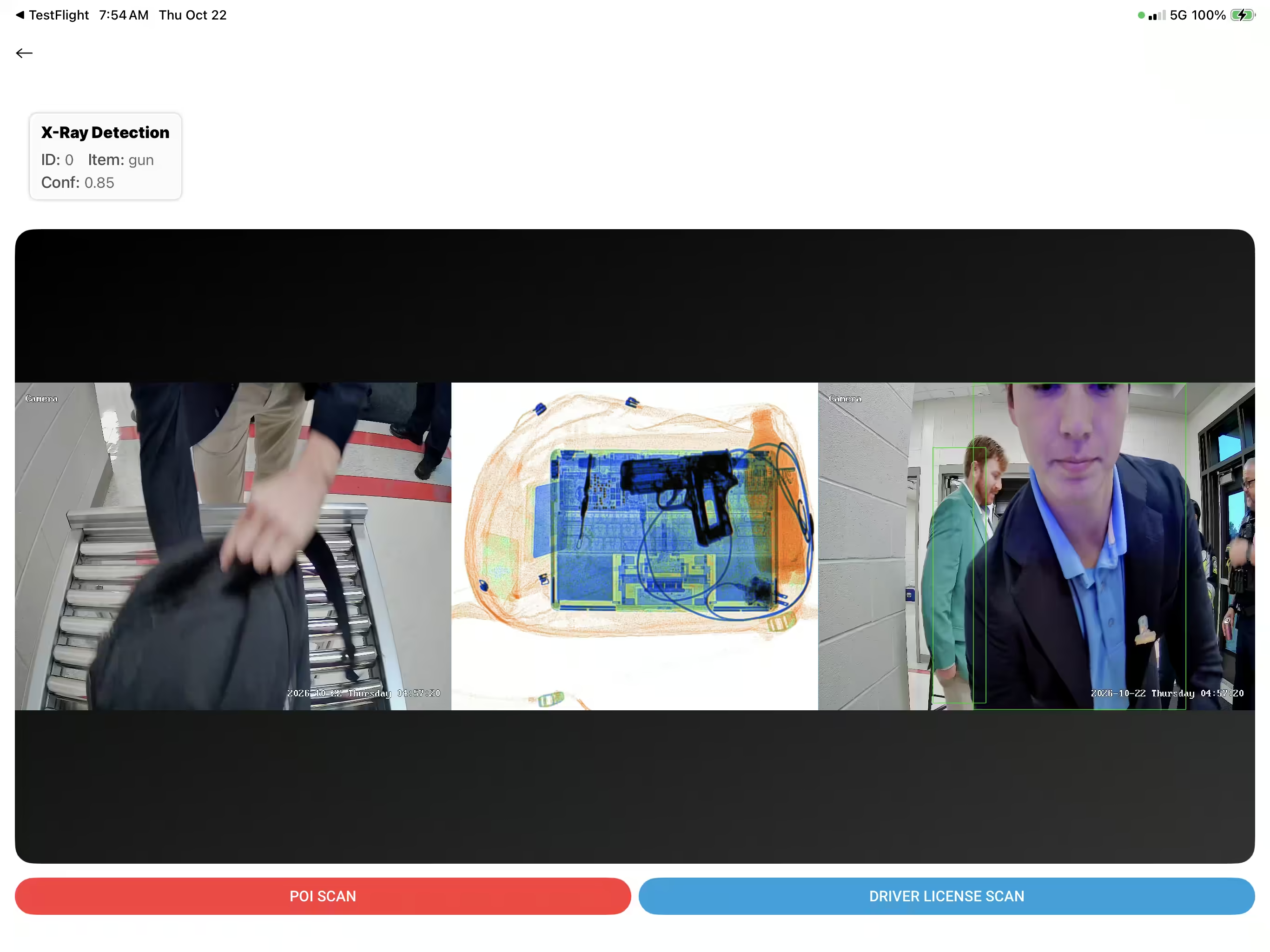
Our “Second Look” review adds one more check. It re-scans cleared X-ray images in the cloud for items hidden under things like laptops or cables. If a remote expert confirms a threat, an alert reaches the on-site tablet within 5 to 7 seconds.
Athena Security vs Omnilert vs ZeroEyes
Our weapons screening system isn’t in the same category as Omnilert or ZeroEyes. Both of them watch existing cameras for guns that are already visible. Our system screens people and bags for concealed weapons at the entrance.
Here’s how the two approaches compare.
| Need | Athena Security (Entryway Screening) | Omnilert and ZeroEyes (Camera-Based AI) |
| Where It Detects | At entry points, from main entrances to EMS entryways | Wherever existing security cameras are installed |
| Concealed Weapon Detection | Yes. It screens people as they walk through and checks their bags with AI X-ray | Built to detect firearms once they’re visible on camera |
| Threats Covered | Firearms, knives (including 2 to 2.5-inch blades), explosives, vapes, and drone parts, across 80+ alert types | Visible firearms. ZeroEyes’ Analytics Suite also covers knives |
| Hardware Footprint | Walk-through detector and AI X-ray baggage scanner. The AI works with Apollo, CEIA, Garrett, and Metrasens detectors | Runs on existing security cameras |
| Who Reviews Alerts | One on-site operator on an iPad, plus remote “Second Look” review of cleared X-ray scans | Omnilert: the customer’s choice, including its UL-certified operators. ZeroEyes: its own analysts, 24/7/365 |
| Alert Speed | AR glasses show alerts within 0.3 seconds. Second Look alerts arrive within 5 to 7 seconds | Omnilert: responses automated “in seconds.” ZeroEyes: about 3 seconds from a gun entering the frame to an alert |
| Throughput | About 2,000 people an hour | Not applicable, since it’s camera-based |
| Best Deployed For | Entry points at schools and hospitals | Ongoing monitoring of areas covered by existing cameras |
Bottom line: Camera-based AI tells you when a gun is visible. Entryway screening is built to stop a concealed weapon at the door.
Watch how Franciscan Health improved their weapons screening with our CWD and caught their first gun within 30 minutes.
When to Consider Athena Security’s Weapons Screening Solution
Here are six types of entrances where our Security’s screening helps stop concealed weapons at the door.
At a Hospital Entrance
Visitors come through the main lobby, while patients on stretchers arrive through the EMS entrance. In the lobby, people walk through the detector while their bags go through the AI X-ray scanner. At the EMS entrance, Athena Security’s Ambulance Bay system screens patients on stretchers using radar mounted above the doorway. It ignores the metal gurney and can pick up concealed non-metallic threats.
At a School Entrance
Hundreds of students arrive within minutes, most carrying backpacks or lunch bags. Students walk through the detector while the system scans their bags at the same time. The AI separates laptops and chargers from real threats, and it can flag 2- to 2.5-inch blades and vapes hidden in bags. Only flagged students or bags go to secondary screening.
Recommended Read: How to Screen a Large Number of Students Quickly for Weapons
At a Casino Entrance
Guests arrive steadily at all hours, many carrying phones, keys, wallets, and coins. Our AI compares each object’s material and shape against known weapon signatures. That helps it tell real threats apart from everyday items and reduce false alarms. Guests who come through clear simply walk in.
Recommended Read: Detecting Weapons at Parkwest Casino (Case Study)
At a Government Building Entrance
Visitors arrive with briefcases and laptop bags, and screening has to follow strict procedures. Our solution screens people and bags at the entrance and builds DHS patron screening guidelines into the operator’s interface. It automatically logs prohibited items, equipment tests, and incident records.
At a House of Worship Entrance
Congregants arrive together before a service, often carrying handbags and coats. People walk through the detector while the AI X-ray scanner scans their bags. If something is flagged, officers wearing AthenaVision AR glasses get a discreet text alert in their line of sight. Command staff can also send silent instructions without radio chatter.
At an Event or Stadium Entrance
Thousands of fans arrive in a short window, many with bags. Athena Security’s walk-through detector and AI X-ray scanner work side by side to screen about 2,000 people an hour. The X-ray can also flag drone motors, propellers, batteries, and structural parts hidden in bags.
For more details, check out our Event Venue Weapons Detection Systems
What Is Athena Security’s Philosophy for AI Gun Detection
Athena Security’s philosophy centers on protecting what matters most by using cutting-edge technology to save lives, moving beyond passive hardware to create high-throughput, discreet, and welcoming entryways.
- Stop the Threat at the Entrance: Spotting weapons at entry points moves security from recording incidents to preventing them. It also gives early warning and buys critical response time.
- AI Supports People Rather Than Replacing Them: AI sharpens an operator’s awareness and decisions without replacing human judgment. Since no system can guarantee 100% accuracy, trained personnel and safety protocols must always back it up.
- Security Works in Layers: No single technology can make a facility completely safe. AI detection is one layer alongside trained staff, active shooter preparation, visitor management, and physical screening protocols.
- One Data Point Isn’t Enough: Our platform combines several data streams, such as low-frequency electromagnetic sensing, thermal imaging, lidar, and AI. Operators also get richer data than shape alone, such as an object’s density and material composition. Together, these boost detection accuracy and cut false alarms.
- Customers Shouldn’t Be Locked Into One Vendor: Athena Security’s AI works across walk-through hardware from Apollo, Garrett, and Metrasens. It normalizes hardware from different vendors.
Together, these principles shape how we build our AI gun and weapons detection systems. Our aim is screening that’s safer and more reliable, without slowing people down at the door.
If you’d like that kind of screening at your facility’s entrances, call us at +1-833-928-4362 or book a demo below.

Frequently Asked Questions About AI Gun Detection
As you compare Omnilert, ZeroEyes, and Athena Security, you might have a few questions. Below, we answer the most common questions. And if your query is not covered below, reach out to our team for a quick discussion.
1. What to Ask Before Choosing Between Omnilert and ZeroEyes?
A few details required for this decision aren’t published on either company’s website. For example, neither shares accuracy or false alarm figures. You should raise these points with each vendor before you commit.
And here are a few things you should ask:
- Ask for verified detections and false alarm data from facilities similar to yours.
- Ask who reviews a flagged image and who makes the call to lock down.
- Since the systems only flag a gun that a camera can see, ask which areas your current cameras cover and whether any need to be added or moved.
- Ask how pricing is structured and what it includes, such as monitoring and integrations. Contract length matters too.
- If you plan to use a state grant or safety program, confirm the platform meets its requirements before you apply.
- Confirm the platform meets the privacy and compliance standards your facility follows, such as HIPAA for hospitals.
2. Can I Use Omnilert or ZeroEyes Alongside an Entryway Weapon Screening System?
Yes. You can use visual AI gun detection systems like Omnilert and ZeroEyes alongside physical entryway weapons screening systems (such as metal detectors or physical checkpoints) as part of a multi-layered security strategy. However, these systems do not detect concealed weapons.
3. Do I Need to Replace my Existing Walk-Through Metal Detectors to Use Athena AI Weapons Screening?
You do not need to replace your existing walk-through metal detectors. We provide an open, hardware-agnostic platform that adds an AI software layer to compatible third-party equipment without requiring hardware replacement.
4. How Many Security Staff Are Needed to Run Athena Security’s Weapons Screening Solution?
The number of people required depends on your traffic volume and entryway layout:
- For Standard / Low-Throughput Operations: 1 operator manages both the walk-through weapons detection system and the baggage X-ray scanner from a single iPad console.
- For High-Volume Peak Intake (e.g., 500+ people/hour morning arrival): 2 security officers (1 stationed at secondary screening and 1 providing overall oversight) plus 5 trained non-security helpers (handling greeter routing, item pass-around, X-ray infeed, post-walkthrough routing, and X-ray bag return).
- For Minimum Security: 1 security officer (stationed at secondary screening) plus 5 trained helpers.
- For Maximum Security: 2+ security officers plus 5+ helpers (used when screening 200+ people per hour, or when alarm rates and threat profiles are elevated).
5. Will Entryway Weapon Screening Slow Down Entry During Busy Hours?
Entryway weapon screening does not inherently slow foot traffic, as people can walk through at normal speed without stopping or emptying pockets—achieving reported throughputs of up to 3,600 people per hour—while bags are screened in parallel on conveyor belts processing up to 2,000 bags per hour.
However, delays can still occur if a facility relies on traditional metal detectors that trigger frequent false alarms from everyday metallic items, or fails to route flagged individuals and bags to a separate secondary screening area off the main entry line.
6. What Happens When Weapon Screening System Flags Someone?
When our system flags a threat, visual indicator lights and audio alarms trigger while the operator console displays a red box or skeletal overlay pinpointing the exact location, and the X-ray belt can automatically stop to secure a flagged bag. The system immediately routes the flagged individual or bag out of the main entrance to a separate secondary screening area for manual inspection and resolution, allowing the main line to keep moving while it automatically logs incident details and photos.
7. How Can I Procure Athena Security’s AI Weapon Detection System?
You can book a free live demo below. Our specialists will respond within 24 hours to understand your security needs and walk you through our security solutions. We’ll then conduct an on-site or virtual assessment of your entrance layouts and peak traffic patterns before providing a customized quote.
You can also email us at [email protected], call us at +1-833-928-4362, or book a demo below.
Disclaimer: The information provided in this article is based solely on publicly available sources and is intended for general informational and guidance purposes only. It should not be relied upon as a final decision-making resource or as a substitute for professional advice. While we strive for accuracy and completeness, we make no representations or warranties regarding the correctness, reliability, or suitability of the content. If you believe any information should be updated, corrected, or removed, please contact our team for review. The images were created using AI-based tools and are for illustrative purposes only. They may not accurately represent real individuals, locations, or situations. Any resemblance to real persons, living or dead, or actual events is purely coincidental.