

Weapons detection is the set of technologies that identify a firearm, knife, or other weapon on a person, in a bag, or in view of a camera, before or as it enters a building. It is a category, not a single product. It includes walk-through screening at an entrance, X-ray screening of bags, passive pillars that sense ferrous metal, and camera and microphone systems that watch and listen for a gun after someone is inside.
Security directors, facilities leaders, school administrators, and hospital executives are being asked to make decisions about it, often on a deadline set by a legislature or a board. This guide is the plain version: what the six types are, how each one works, what each one misses, why buildings are adopting it now, and how to evaluate a system without a vendor’s slide deck in the room.
What Are the Types of Weapons Detection?
The six types split into two families. Four screen people and bags at an entrance, before a weapon gets inside. Two watch an area after someone is already in. The split matters more than any brand name, because it decides what a system can and cannot do for you.
Walk-Through AI Screening
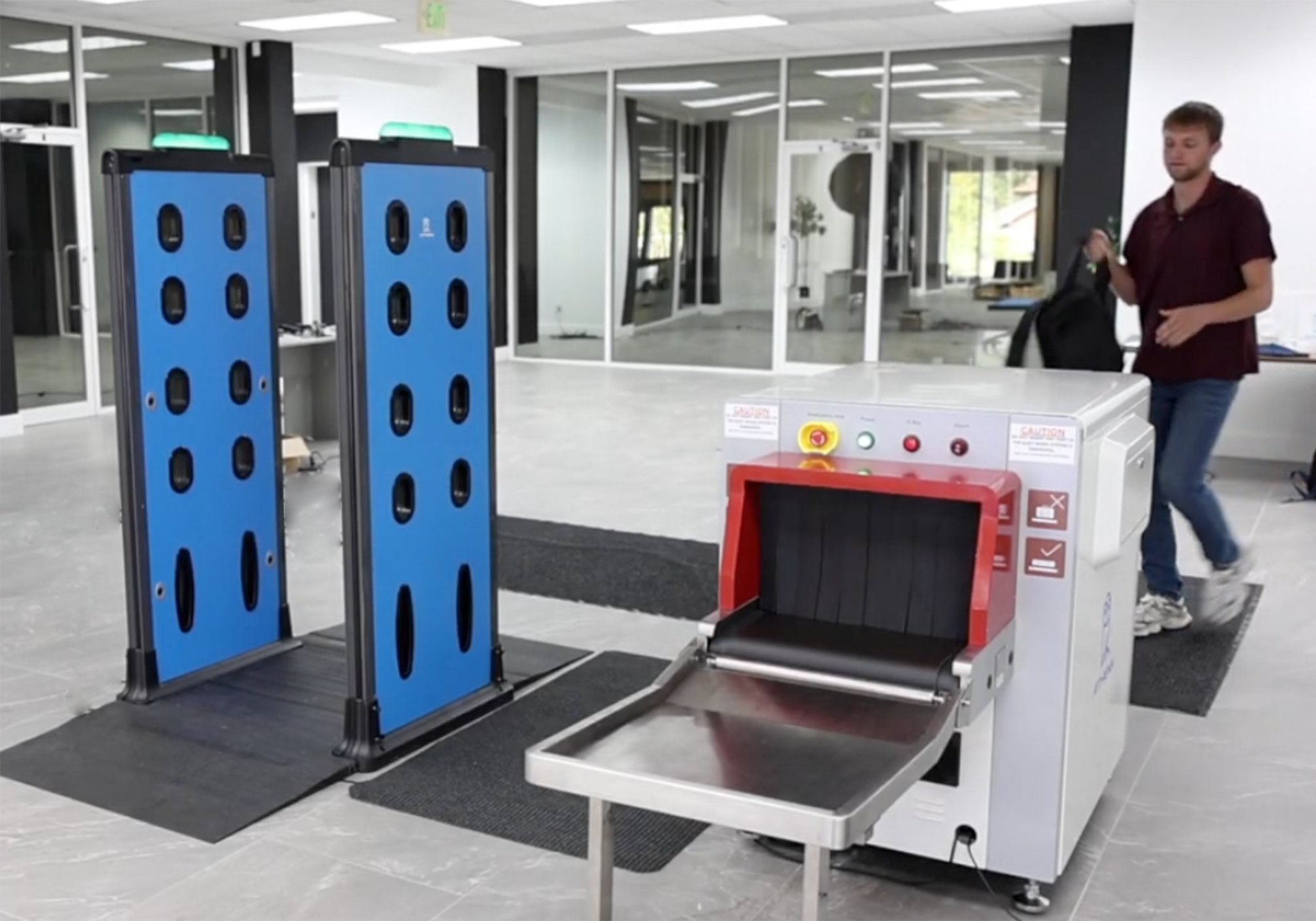
This is the technology most people picture when they hear the term. Two panels form a lane. Visitors walk through at normal pace, carrying their phones, keys, and bags. The panels combine a multi-frequency active-wave metal detector with cameras, optical sensors, and on-device processing. The system decides whether an object on the person is likely a weapon and shows the operator where on the body it sits. Athena’s Apollo 500 is the walk-through system in this category. Athena rates it for a flow rate of up to 3,600 people per hour under normal operating conditions; actual throughput depends on lane configuration, what visitors carry, and how often secondary screening is triggered. Walk-through screening is built for the main entrance, the emergency department, the school arrival period, and the venue gate, where the crowd will not tolerate emptying pockets.
Passive Ferromagnetic Detection
A ferromagnetic detector is a pillar, not a portal. It transmits nothing. It senses disturbances in the earth’s magnetic field caused by ferrous metal, such as iron and steel, moving past it. It can detect ferrous objects such as steel firearms and blades, subject to configuration, orientation, size, and environmental conditions, and it works on people who are in wheelchairs or on gurneys, since only movement past the pillar is required. It does not see non-ferrous metals like aluminum or copper, and deployments often require careful tuning of the space around them. The Metrasens Ultra is the common example, and it is frequently chosen for behavioral health units, where the priority is sensitivity to ferrous weapons in a controlled setting.
AI-Assisted X-Ray Bag Screening
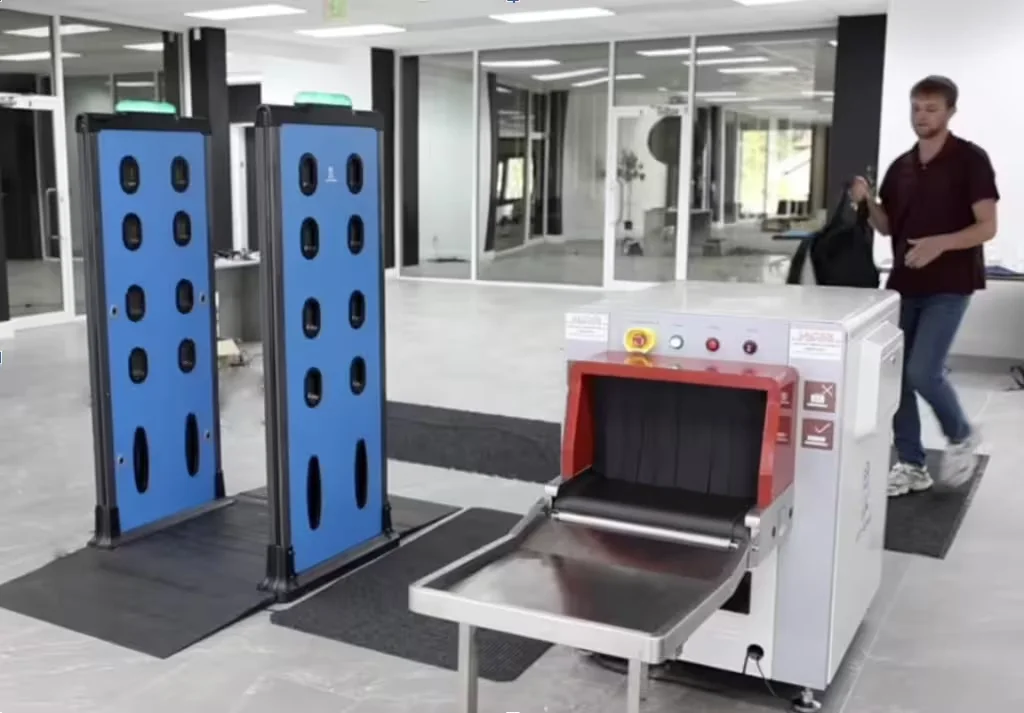
X-ray images what a walk-through system does not: the contents of bags and parcels. Bags ride a belt through a dual-energy X-ray source, which images objects by shape and by material composition. AI on top of the image circles likely threats for the operator and can stop the belt automatically when it finds one. Athena’s AI Assisted X-Ray runs on existing X-ray machines. At its fastest belt speed of 0.75 m/s, Athena rates it at approximately 2,000 bags per hour; sustained throughput depends on bag spacing, operator review time, and how often the belt stops for a second look. One operator can monitor and control the walk-through lane and the belt from a single tablet, with bag handling and secondary screening staffed separately as policy requires. X-ray is the usual second layer wherever a bag check is policy, and it is commonly used as the primary screening layer for parcels at loading docks and mail rooms.
Legacy Magnetometers and Metal Detectors
A magnetometer, in security use, is the traditional walk-through metal detector: a portal that alarms when metal above a threshold passes through. It is proven, widely deployed in courthouses and venues, and lower in upfront cost. Its limit is that it cannot tell a weapon from a laptop, so every alarm requires a hand wand, one person at a time, and most units cannot log data automatically. Modern platforms narrow that gap: Athena’s platform connects to CEIA OPENGATE and CEIA walk-through metal detectors, Garrett 6500i and Paragon, and Metrasens Ultra, adding AI evasion detection, real-time alerts, and reporting to hardware a building already owns.
Visual Gun Detection
Visual gun detection, sometimes called brandished firearm detection, runs software on existing security cameras to recognize a gun that is visibly drawn and to alert in real time. It covers areas a screening lane never sees, such as parking lots, hallways, and exteriors. Its limit is in the name: it identifies a firearm only once it is in view, so a concealed weapon walks past it. It is an area technology, not a screening technology, and belongs in the plan as a second layer behind the entrance, not instead of one.
Acoustic Gunshot Detection
Acoustic systems place microphones through a building or campus and listen for the sound signature of a discharge. When they detect one, they estimate its location and alert responders. They can rapidly alert responders after detecting a suspected gunshot, and they detect nothing before the first shot. Like visual detection, they shorten response. They do not prevent entry.
Weapons Detection Compared, Type by Type
One table, six rows. The columns to read first are “what it misses” and “where it sits,” because those two decide the design more than any detection statistic.
| Type | What it screens | What it finds | What it misses | Where it sits | Staffing |
|---|---|---|---|---|---|
| Walk-through AI screening | People, at walking pace | Firearms and large edged weapons on the body, with location on the person | Does not image bag contents; small non-metallic items | Main entrances, emergency departments, school arrivals, venue gates | One operator per lane, plus secondary screening |
| Passive ferromagnetic detection | People, moving past a pillar | Ferrous (iron and steel) weapons, including on wheelchairs and gurneys | Non-ferrous metals such as aluminum and copper; stationary objects | Behavioral health units, corridors, controlled units | One officer per pillar during use |
| AI-assisted X-ray bag screening | Bags and parcels on a belt | Weapons and prohibited items inside bags, by shape and material | Anything carried on the body | Beside a walk-through lane; loading docks; mail rooms | One operator to monitor the belt, shareable with the lane; bag handling staffed separately |
| Legacy magnetometer | People, one at a time | Any metal above a set threshold | Cannot tell a weapon from keys, a phone, or a laptop | Courthouses, venues, older installations | Wand per alarm; no automatic data log |
| Visual gun detection | Camera views, inside and outside | A firearm that is visibly drawn | Anything concealed; a weapon never brandished on camera | Existing security cameras | Monitoring center to verify and dispatch |
| Acoustic gunshot detection | Sound, across an area | A firearm after it has been discharged | Everything before the first shot | Ceilings, campuses, outdoor areas | Monitoring and response, not screening |
No single row covers a building. The usual pattern is a walk-through lane for people at the main entrance, an X-ray belt where bags must be checked, passive detection in controlled units, and area detection behind all of it. For a deeper side-by-side of the four entrance technologies, including throughput and cost drivers, see weapons detection systems compared.
How Does Weapons Detection Work?
Strip away the hardware and every type follows the same five steps. A sensor reads a signal. Software decides whether that signal looks like a weapon. The system alerts an operator. A trained person resolves the alert. The event is logged.
The sensor is what changes: an electromagnetic field for walk-through and magnetometer systems, X-ray for bags, a camera for visual detection, a microphone for gunshot detection. The AI in modern systems lives in step two. In a legacy portal, step two is a threshold: metal above this amount, alarm. In a walk-through AI system, step two is a decision made from multiple frequencies, optical sensors, and camera views together: is this object shaped and composed like a weapon, and where on the person is it? That is why the operator of an AI lane sees a location on a silhouette rather than a light and a tone, and why keys, phones, and laptops can pass without stopping the line.
Steps three through five are the part of weapons detection that vendors talk about least and that a security director lives with every day. The Department of Homeland Security’s best practices for patron screening expect written secondary screening procedures (8.5), equipment testing and documentation (8.2), a prohibited items log (14.2.2), and illegal items notification procedures (14.2.1). A system that stops the belt or lights up a silhouette is only half the control; the procedure that follows and the record it leaves are the other half. Our DHS weapons screening guidelines page walks through what each of those documents should contain.
What Weapons Detection Does Not Do
Naming the limits is how you tell a serious vendor from a slide deck. Four to hold onto.
- It is not a metal detector, and a metal detector is not weapons detection. A metal detector reports metal. Weapons detection reports a likely weapon, and where it is. If a proposal uses the two terms interchangeably, ask which one it is selling.
- It is not a guarantee. No screening technology detects every weapon in every configuration. Walk-through systems do not image bag contents the way X-ray does. Ferromagnetic pillars do not see aluminum. Cameras do not see what is concealed. The honest question to a vendor is not “does it detect everything” but “what does it miss, and what covers that.”
- It does not replace trained staff. Every flagged object should be reviewed by a trained staff member. The technology gives the officer better information faster; it does not make the decision for them. Staffing per lane at peak, including secondary screening, is one of the numbers that decides the real cost of a system, and it belongs in the evaluation from the first meeting.
- It does not, on its own, satisfy a law. California’s AB 2975 names automated weapons detection at specified hospital entrances, but its clock starts when Cal/OSHA’s implementing regulations are final. New York’s Public Health Law 2832 names no technology at all; it requires an annual assessment and a plan. Both treat detection as one control inside a program, and so should you.
Why Are Organizations Adopting Weapons Detection Now?
Three pressures are arriving at once. The first is regulatory. California’s AB 2975 mandates automated weapons detection at specified hospital entrances, with implementing regulations due from the Occupational Safety and Health Standards Board by March 1, 2027; our complete guide to AB 2975 compliance covers the requirements. New York’s Public Health Law 2832 requires every general hospital to conduct a workplace safety and security assessment each year from January 1, 2027, considering layout, access points, visitor management, access control, and engineering controls; our New York hospital security assessment requirements post explains what that assessment must cover. Other states are drafting.
The second is institutional. Boards, insurers, and unions ask what the building does at the door, and “we have officers” is no longer a complete answer. An assessment that can point to a screening technology, a daily test log, and an incident record is a different conversation from one that cannot.
The third is that the technology caught up with the crowd. A legacy portal at a hospital entrance or a school door produced a line, because every laptop and set of keys alarmed. Walk-through AI screening rated in the thousands of people per hour, with harmless everyday items passing, is what made screening at those doors operationally possible. Duke Health deployed Athena’s platform across 21 screening locations. Lamar Consolidated ISD installed 24 systems throughout the district. Neither would have been workable with a wand at every alarm.
How Should You Evaluate a Weapons Detection Solution?
Comparison testing is worth doing, and it is worth doing on your own terms rather than a vendor’s. Six questions, all of them answerable in a demo or a pilot.
- What does it detect, and what does it miss? Firearms are the baseline. Ask about edged weapons, razor blades, and small items, and whether non-ferrous metals are seen at all. Then ask separately how bags are screened. Walk-through weapons detection does not image or directly inspect the contents of a bag the way an X-ray system does; depending on the object, configuration, and sensitivity settings, it may still detect the signature of a weapon carried inside a bag.
- What is the throughput at your peak? Measure the arrival period, not the daily average. A rated flow figure means nothing if the lane is staffed for a fraction of it, and rated figures assume normal operating conditions.
- What happens with everyday items? Walk a laptop, a phone, an umbrella, and a set of keys through. Count the alarms. Every alarm costs an officer’s time and a visitor’s patience, and the nuisance alarm rate is what decides whether the lane holds up at 8 a.m.
- How many people does it take per lane? Count operators at peak, including secondary screening. A system that lets one operator monitor and control the lane and the X-ray belt from one tablet is a different budget from one that needs a dedicated operator for each.
- What records does it produce? Ask to see the prohibited items log, the daily test record, and the incident report the system generates, and how long it retains them. Athena’s default retention period is five years and can be configured to an organization’s retention requirements.
- Does the software run only on the vendor’s hardware? Some weapons detection platforms require proprietary hardware. A platform that also runs on CEIA, Garrett, and Metrasens hardware lets you keep what you own and add intelligence to it, and it means the next hardware decision is yours.
Costs vary based on your facility size, number of entry points, and integration requirements. Staffing can become one of the largest five-year operating costs, especially where frequent secondary screening requires additional personnel, which is why questions three and four above deserve as much attention as the quote.
Frequently Asked Questions About Weapons Detection
What is weapons detection?
Weapons detection is the set of technologies that identify a firearm, knife, or other weapon on a person, in a bag, or in view of a camera, before or as it enters a building. Entrance screening types include walk-through AI screening, passive ferromagnetic detection, X-ray bag screening, and legacy magnetometers. Area detection types include visual gun detection on security cameras and acoustic gunshot detection. Each type answers a different question, and most buildings combine two or more.
How does weapons detection work?
Every type follows the same five steps: a sensor reads a signal, software decides whether that signal looks like a weapon, the system alerts an operator, a trained person resolves the alert with a secondary screening or a response, and the event is logged. The sensor is what changes between types: an electromagnetic field for walk-through and magnetometer systems, X-ray for bags, a camera for visual detection, and a microphone for gunshot detection. The AI in modern systems works on the second step, deciding what the signal is and where on the person it sits.
Is weapons detection the same as a metal detector?
No. A metal detector alarms on metal above a threshold and tells the officer nothing else, so keys, phones, and laptops produce the same alarm as a firearm. Weapons detection uses cameras, sensors, and AI to decide whether an object is likely a weapon, to show the operator where it is on the person, and to let harmless everyday items pass. A metal detector is one sensor; weapons detection is the sensor plus the decision, the alert, the secondary screening, and the record.
What types of weapons detection are there?
Six. Four screen people and bags at an entrance: walk-through AI screening such as Athena’s Apollo 500, passive ferromagnetic detection such as the Metrasens Ultra, AI-assisted X-ray screening for bags, and legacy walk-through magnetometers such as CEIA and Garrett portals. Two watch an area after someone is inside: visual gun detection, which uses cameras and software to recognize a drawn firearm, and acoustic gunshot detection, which listens for the sound signature of a discharge.
Does weapons detection require trained staff?
Yes. Every flagged object should be reviewed by a trained staff member, and the Department of Homeland Security best practices for patron screening expect written secondary screening procedures, daily equipment testing, and a prohibited items log. The technology decides faster and with more information than a metal detector, but it helps the officer decide; it does not decide for them. A vendor should train the team at installation and stay available afterward.
Ready to see how it works? Book a 30-minute demo and we’ll walk through which of the six types fits each of your entrances, what each one will miss, and what the records look like. Or start with weapons detection systems compared to see the four entrance technologies side by side.
Sources: athena-security.com product and compliance pages; Department of Homeland Security best practices for patron screening (section numbers as cited); California AB 2975; New York Public Health Law Sections 2832 and 2832-a (Chapter 618 of 2025). Photographs are Athena Security’s own equipment.